Look for a timer that shows the countdown on the Lock Screen and in the Dynamic Island (a Live Activity), runs focus sessions and short and long breaks for you, lets you change the lengths, sends reliable notifications, keeps stats you'll actually look at, and doesn't get in the way with ads or an account. Pomodoro Focus, the app made by the author of this guide, does all of this for free.
The checklist
1. The countdown is on the Lock Screen
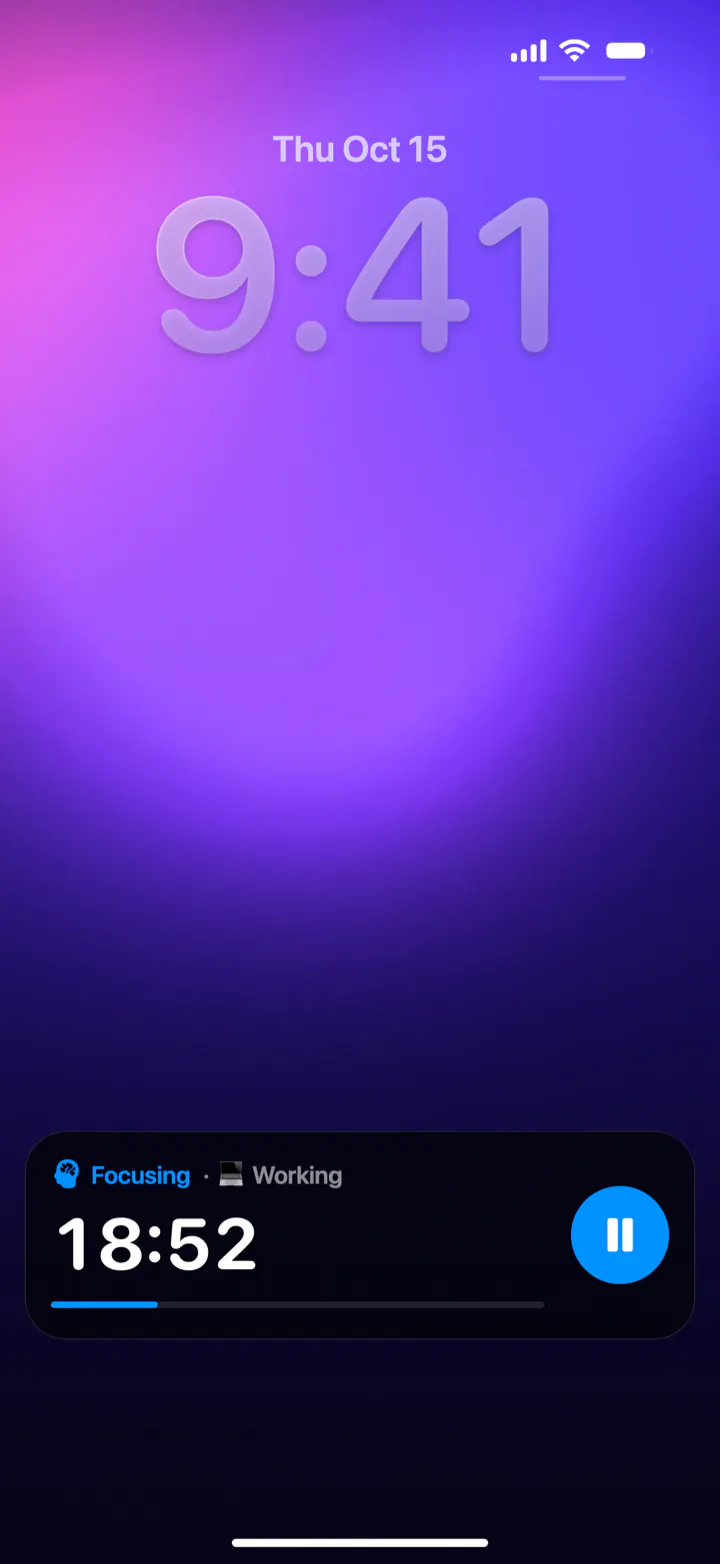
This matters more than anything else. If you have to unlock your phone to see how much time is left, you'll end up in your messages. Since iOS 16, apps can show a Live Activity: a live card on the Lock Screen and, on iPhones that have one, in the Dynamic Island. Look for one that also lets you pause and start your next break from there.
2. It runs the whole cycle
A Pomodoro timer should know what comes next: a short break after each focus session and a longer one after every few. When a stage ends, the next one should be one tap away, from the notification or the Lock Screen.
3. You can change the lengths
25 and 5 minutes is the classic, but deep work often goes better with 45 or 50 minutes, and a dreaded task with 15. Being able to set focus, short break and long break lengths separately is a must.
4. Notifications you can rely on
You should hear when a focus or a break ends, even with the phone locked and another app open. If you use a Focus mode like Do Not Disturb, check that you can allow the timer's notifications in it.
5. Stats you'll actually look at
Seeing your focus time for the day, week and month, your sessions and your streak is surprisingly motivating. Categories, like one per subject or project, show where your hours really go.
6. Quick ways to start
The fewer taps it takes to start, the more often you'll do it. Good signs: a control for Control Center or the Action button, and support for Siri and the Shortcuts app.
7. Sounds, if you like them
Ambient sounds like rain or a waterfall cover background noise. They're a nice extra, especially if they pause with the timer and can play alongside your own music.
8. No ads, no account, a fair price
An ad between two focus sessions defeats the purpose, and a timer shouldn't need your email address. Check what's free and what's behind a subscription before you get used to an app.
9. A design you enjoy
You'll open it several times a day. A calm, good-looking app that you like opening helps the habit stick.
What iOS already has
You can do a basic Pomodoro without installing anything:
- The Clock app's timer counts down on the Lock Screen. You start every focus and every break by hand, and it doesn't keep a record.
- Focus modes (Settings › Focus) silence notifications from people and apps you choose. They don't time anything, but they pair well with a timer.
- Background Sounds (Settings › Accessibility › Audio & Visual) play steady noise or nature sounds, like rain, ocean or a stream.
| Clock app timer | Pomodoro Focus | |
|---|---|---|
| Countdown on the Lock Screen | Yes | Yes, with pause and start buttons |
| Focus and break cycle | No, you restart it every time | Yes, breaks are one tap away |
| Long break every few sessions | No | After every 3 focus sessions |
| Stats, categories, streak | No | By day, week and month |
| Ambient sounds | Separately, in Background Sounds | 6 sounds that pause with the timer |
| Price | Free, built in | Free, no ads |
Tip: use both. Turn on a Focus mode such as Do Not Disturb or Work to silence other apps, and add Focus Timer to the apps allowed in that Focus, so you still hear when a break starts.
When another app might suit you better
A focused timer app isn't for everyone. You may want something else if you need:
- Android, Windows or the web. Pomodoro Focus is for iPhone and iPad only.
- Task lists and projects inside the timer. Pomodoro Focus tracks time by category, but it isn't a to-do app.
- An Apple Watch app. Pomodoro Focus doesn't have one yet.
- Website or app blocking. Use Screen Time or a Focus mode for that.
Our pick: Pomodoro Focus
We make it, so we're biased, but it was built around exactly this checklist. It's free, with no ads, no account and no in-app purchases, and runs on iPhone and iPad with iOS 26 or later.
- A Live Activity with the countdown, a progress bar and pause and start buttons on the Lock Screen and in the Dynamic Island.
- Focus sessions of 10 to 90 minutes, short breaks of 1 to 15, and a long break of 10 to 40 minutes after every 3 sessions; or No breaks, an open-ended stopwatch for flow.
- Stats by day, week and month, with categories, sessions and a day streak.
- Six ambient sounds: rain, forest, campfire, waterfall, thunderstorm and office.
- Start from Control Center, the Lock Screen, the Action button, Siri or Shortcuts.
- Animated backgrounds in seven colors that follow the stage, and iCloud sync between your devices.
Questions
Does iPhone have a built-in Pomodoro timer?
No. The Clock app's timer can count down 25 minutes and shows on the Lock Screen, but you have to start every focus and every break yourself, and it keeps no record. A Pomodoro app runs the cycle for you.
Is there a free Pomodoro app for iPhone without ads?
Yes. Pomodoro Focus is free, with no ads, no account and no in-app purchases.
Can a Pomodoro timer show on the iPhone Lock Screen?
Yes, if the app supports Live Activities. Pomodoro Focus shows the stage, the time left, a progress bar and a pause button on the Lock Screen and in the Dynamic Island.
Should I use a Focus mode with a Pomodoro timer?
It helps. A Focus mode silences other apps while you work. Allow your timer app's notifications in that Focus so you still hear when a break begins.
Does Pomodoro Focus work on iPad?
Yes. It runs on iPhone and iPad with iOS or iPadOS 26 or later, and your sessions sync between them through iCloud.