Deep focus, made simple.
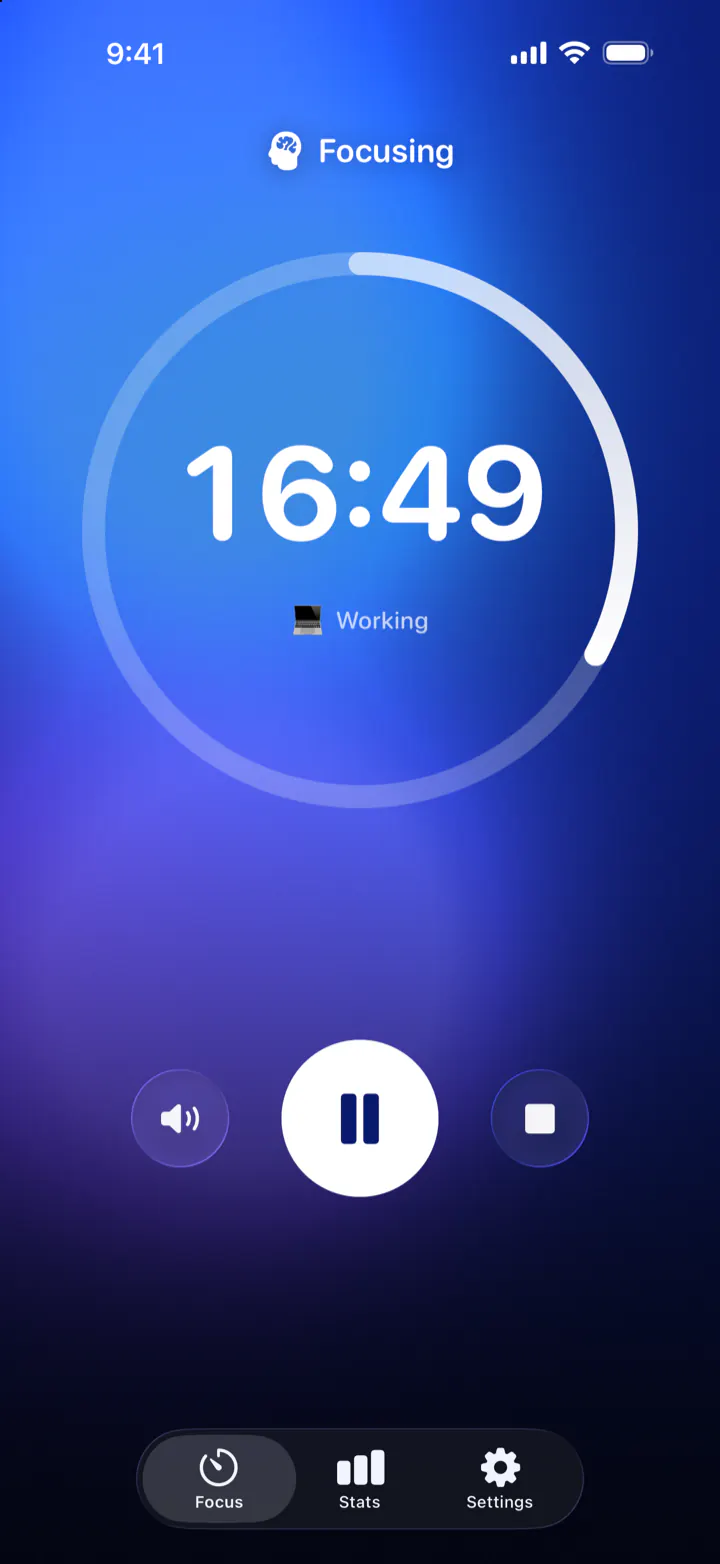
A calm, beautiful Pomodoro timer that helps you study, work and read with deep focus, and actually take your breaks. The countdown lives on your Lock Screen, so you never have to unlock your phone and get distracted.
FreeNo adsNo accountiOS 26
- Free
- No ads
- No account
- No in-app purchases
- iPhone and iPad
- iCloud sync
- 11 languages
Focus, rest, repeat.
The Pomodoro Technique splits your work into short, focused sessions with breaks in between. Pomodoro Focus runs the whole cycle for you, and the colors change with every stage, so you can tell where you are at a glance.
-
Focus
25 minutes on one thing
Pick what you're working on, like Studying, Working, Reading or a category of your own, and press Start. Put the phone down: the countdown is on your Lock Screen if you need it.
Adjustable from 10 to 90 minutes
-
Short Break
5 minutes to breathe
When the focus ends, your break is ready. Start it with one tap from the app, the notification or the Lock Screen, then stand up, stretch or get some water.
Adjustable from 1 to 15 minutes
-
Long Break
20 minutes to recharge
After every 3 focus sessions you've earned a longer rest. Take a walk, have lunch, let your mind wander. Then the cycle starts again.
Adjustable from 10 to 40 minutes
- Focus
- Short Break
- Focus
- Short Break
- Focus
- Long Break
In the zone and don't want to stop? Switch to No breaks: the timer becomes an open-ended stopwatch, so a good flow session can last as long as it lasts. New to the method? Read how the Pomodoro Technique works.
Your timer on the Lock Screen.
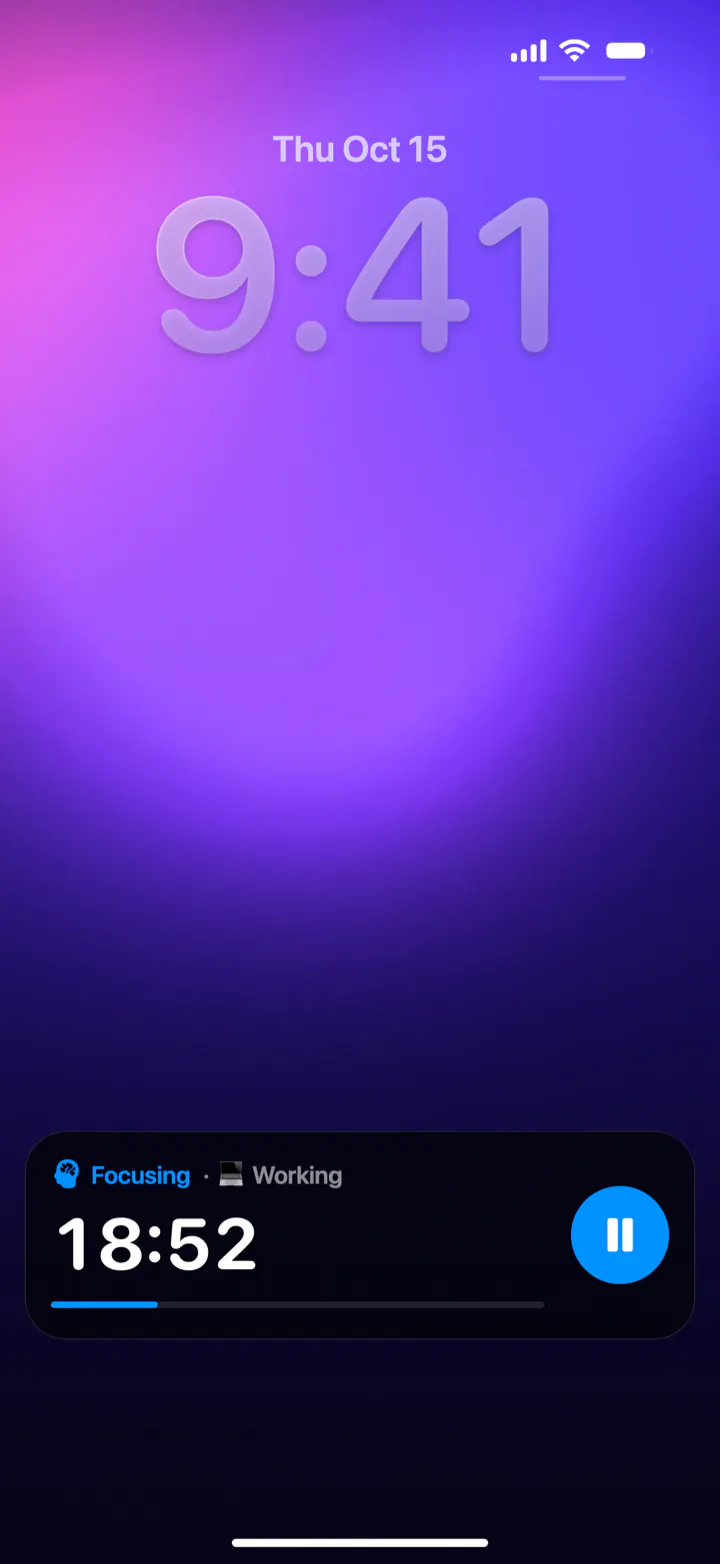
The countdown stays on your Lock Screen and in the Dynamic Island while you work. Pause it or start your break right there, without unlocking your phone and getting pulled into everything else on it.
- Time left and a progress bar on the Lock Screen
- A compact timer in the Dynamic Island; touch and hold it for more
- Pause, resume and start the next stage with one tap
- Notifications when a focus or a break is over, even when your phone is locked
Watch your focus grow.
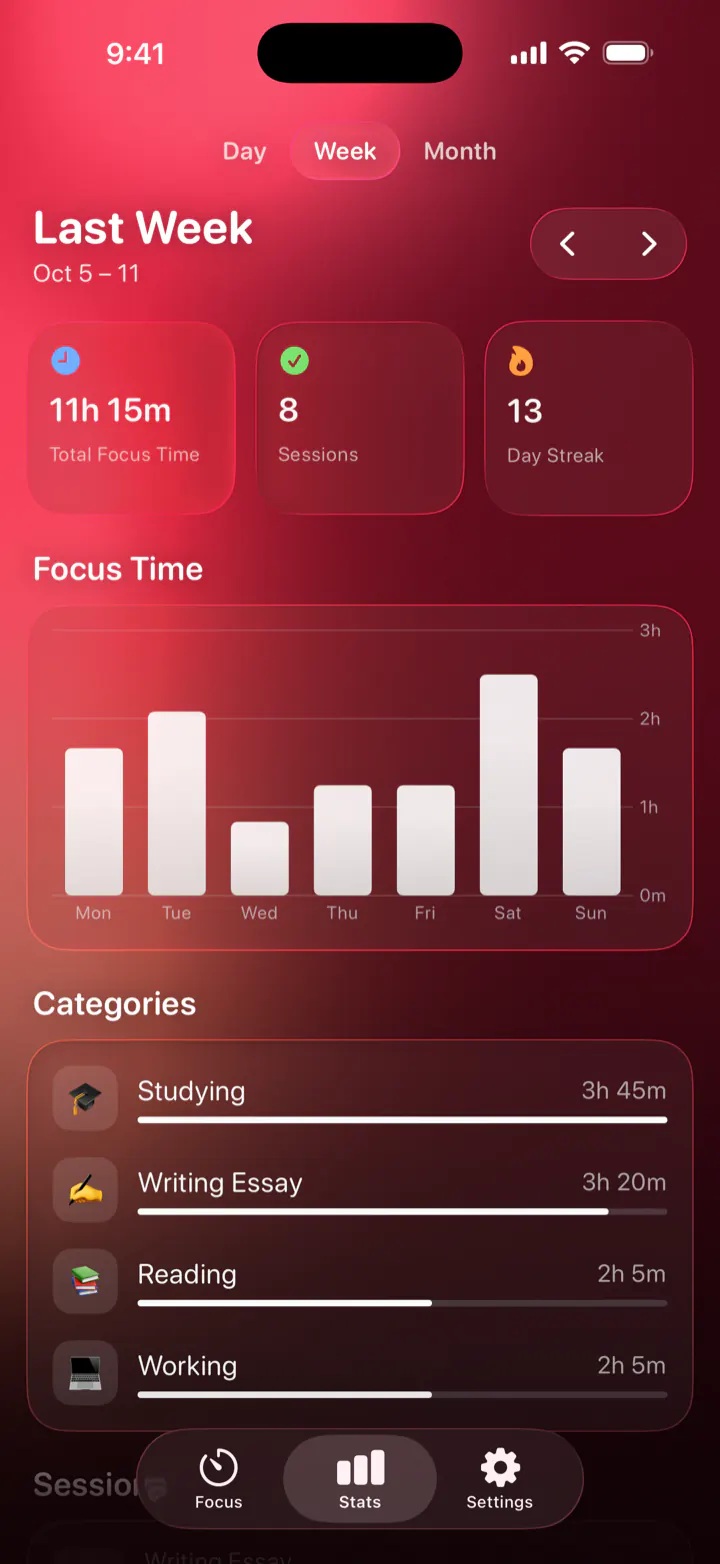
See how much you focused today, this week or this month, how many sessions you finished and how many days in a row you've kept it up. Categories show where your hours actually go.
- Total focus time, sessions and your day streak
- A chart by day, week or month
- Time per category: studying, work, reading or anything you add, each with its own emoji
- A small celebration for every finished session
Sounds that help you focus.
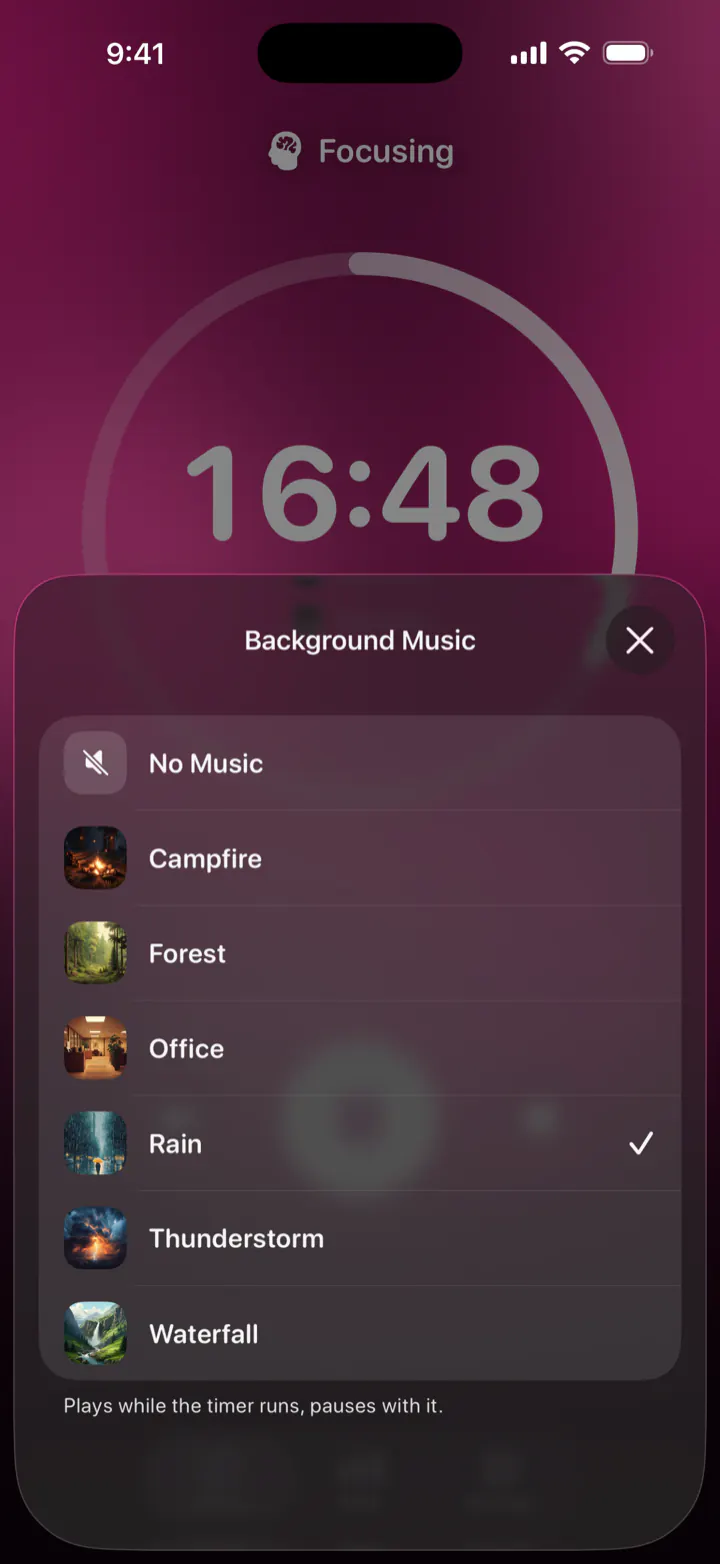
A steady soundscape covers the chatter, traffic and clatter around you. Pick one of six: it plays while the timer runs, pauses with it and mixes with anything else you're listening to.








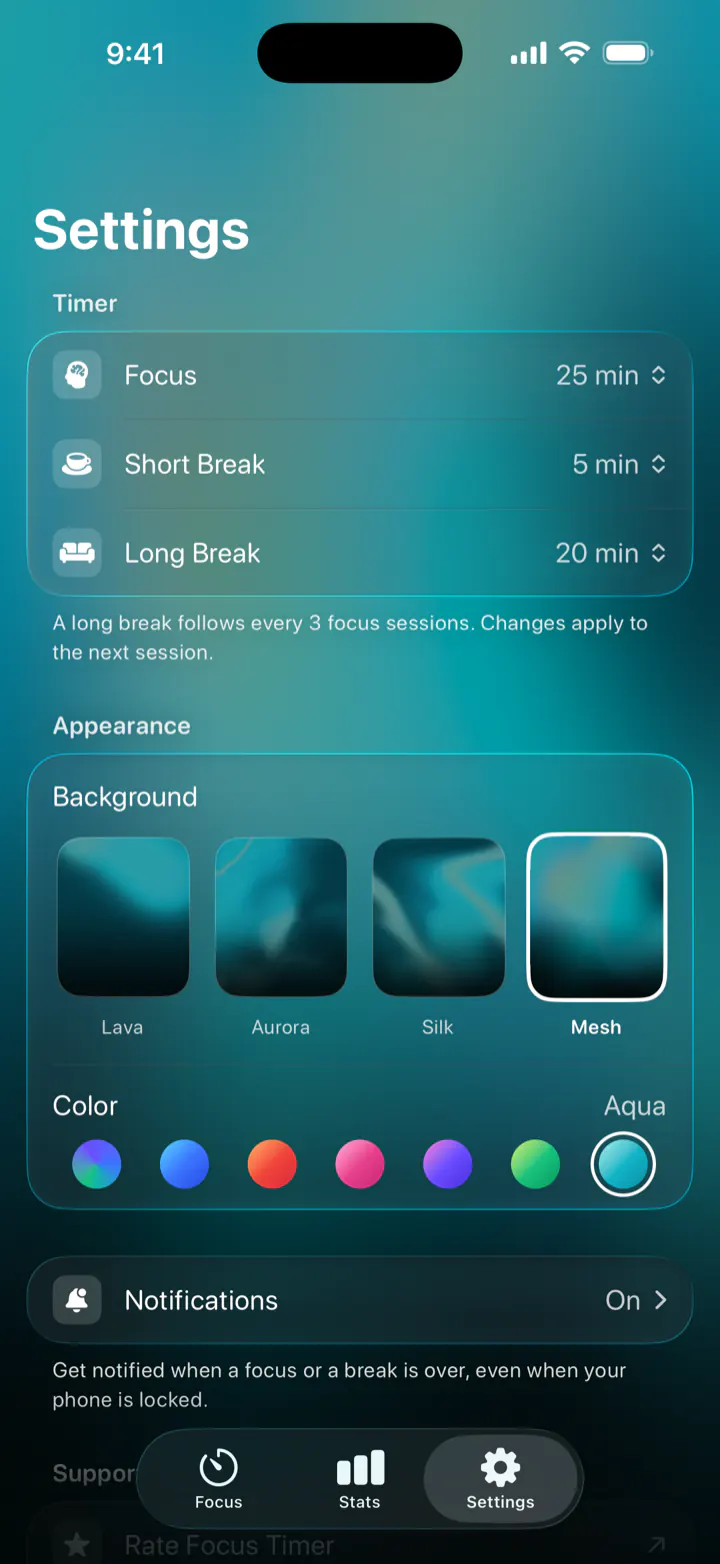
A look for every mood.
Four animated backgrounds, Lava, Aurora, Silk and Mesh, in seven colors. With Auto, the color follows the stage: blue while you focus, green on a short break, purple on a long one. This page uses the same backgrounds, so go ahead and try them.
Background
Color
Auto
Everything you need. Nothing you don't.
No account, no ads, no clutter. Set your durations once and get to work.
-
No breaks mode
An open-ended stopwatch for long flow sessions: coding, writing, practicing an instrument. Stop when you're done and the time goes to your stats.
-
Start from anywhere
Add the Start Focus control to Control Center, the Lock Screen or the Action button, or say “Start focus in Focus Timer” to Siri. It works in Shortcuts too.
-
Categories
Studying 🎓, Working 💻, Reading 📚 or your own, each with an emoji.
-
Notifications
Know when a focus or a break is over, even with your phone locked.
-
iCloud sync
Your sessions and categories, on your iPhone and iPad.
-
A little celebration
Confetti and your numbers for every session you finish.
-
No account, no ads
Open the app and start. Nothing to sign up for, nothing to buy.
-
11 languages
English, German, Spanish, French, Italian, Japanese, Korean, Dutch, Portuguese, Russian and Chinese.
Calm on the big screen, too.
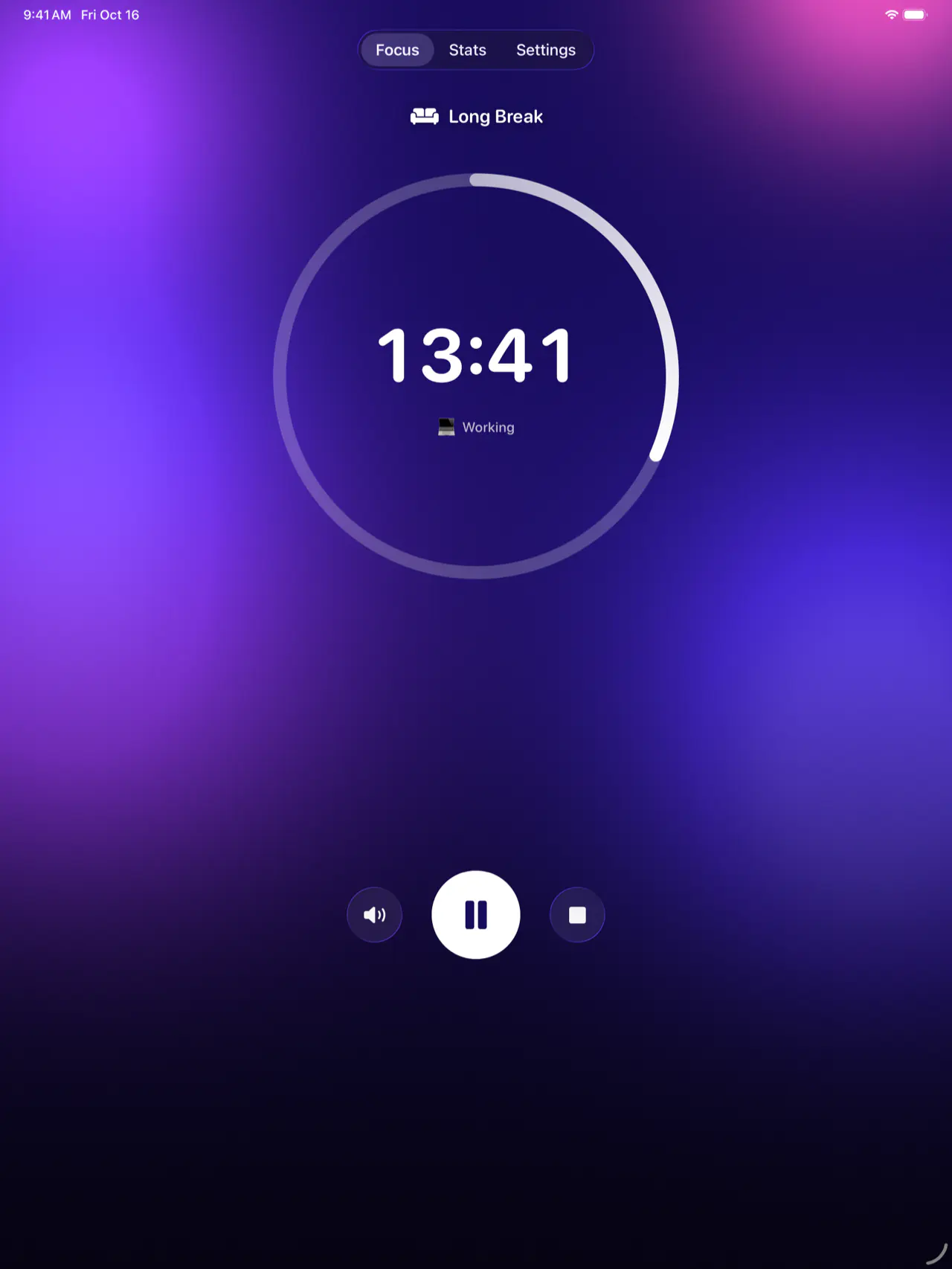
The same timer, stats and sounds on iPad. Stand it next to your laptop or books as a focus clock, and your sessions sync with your iPhone through iCloud.
Get more out of every session.
Short, practical guides to focusing better, whichever timer you use.
What is the Pomodoro Technique?
How it works, why 25 minutes, and how to use it step by step.
Read the guidePomodoro for studying and exams
Study plans, session lengths and what to do in each block and break.
Read the guideThe best Pomodoro timer for iPhone
What to look for in a focus timer app, and what iOS already has built in.
Read the guideFocus sounds: rain and white noise
Why steady sounds help you concentrate, what research says, and how to use them.
Read the guideA timer on your Lock Screen
How Live Activities work, how to turn them on, and what to do when one doesn't show.
Read the guideHelp and support
Answers to common questions, and how to reach the developer.
Get help
Questions, answered.
Is Pomodoro Focus free?
Yes. Pomodoro Focus is free, with no ads, no account and no in-app purchases.
What is the Pomodoro Technique?
A way to work in short, focused sessions with breaks in between: traditionally 25 minutes of focus, then a 5-minute break, and a longer break after a few sessions. Our guide to the Pomodoro Technique explains how to use it step by step.
Can I change how long sessions and breaks are?
Yes. In Settings, focus can be 10 to 90 minutes, short breaks 1 to 15 minutes and long breaks 10 to 40 minutes. The defaults are 25, 5 and 20. A long break follows every 3 focus sessions, and changes apply to the next session.
Does the timer keep running when I lock my iPhone?
Yes. The countdown stays on the Lock Screen and in the Dynamic Island as a Live Activity, where you can also pause it or start your break. A notification tells you when a focus or a break is over, even when your phone is locked.
Can I focus without breaks?
Yes. Switch the mode from Pomodoro to No breaks and the timer becomes an open-ended stopwatch, so you can stay in flow for as long as it lasts. The time still goes to your stats.
Which ambient sounds are included?
Rain, forest, campfire, waterfall, thunderstorm and office. The sound plays while the timer runs and pauses with it, and it mixes with other audio on your phone.
Does it work on iPad?
Yes. Pomodoro Focus runs on iPhone and iPad with iOS or iPadOS 26 or later, and your sessions sync between them through iCloud.
Can I start a focus session with Siri or the Action button?
Yes. Add the Start Focus control to Control Center, the Lock Screen or the Action button, or start a session with Siri and the Shortcuts app, for example by saying “Start focus in Focus Timer”.
Do I need an account?
No. There is nothing to sign up for. Your sessions and categories are stored on your device and in your own iCloud account.
Why is the app called Focus Timer on my Home Screen?
Focus Timer is its short name under the icon. On the App Store it's listed as Pomodoro Focus - Study Timer. It's the same app.
What data does the app collect?
No account and no ads, so no profile of you. The app sends usage statistics and crash reports that help fix bugs and improve it, and nothing in them includes your name or email. Read the privacy policy for the details.
Is there an Android or web version?
No. Pomodoro Focus is made for iPhone and iPad only.
Your next focus session starts now.
Free on the App Store for iPhone and iPad. Pick a task, press Start, and let the timer handle the rest.

Requires iOS 26 or lateriPhone and iPad